
Ghost CMS - Table of contents for posts and pages
Why a custom table of contents?
This site is based on the Ghost CMS. Ghost is open source, wonderfully modular, and highly customizable. However, what it lacks is a post module for a table of contents. Such a standard module simply does not exist.
An interesting Reddit post (see here) gave me the idea of creating a modularly integrated table of contents. It should be easily inserted into any post with a single line and automatically generate and update itself.
I have taken the code base from Reddit, rewrote it for performance and generalization, extended and optimized it accordingly.
Conceptual Thoughts
The table of contents uses hashtags in posts to define a post-specific language alongside the global system language (e.g., #de, #en).
The language of the table of contents heading is determined in three steps:
- By checking the post's hashtag.
- If no hashtag defines a known language, the
html-langelement (the global system language) is used. - If no valid language is detected, English is used as the default.
Additionally, the table of contents automatically searches for headings in the post and lists them hierarchically based on their level (h2, h3, etc.).
Tag lists from some Ghost themes are excluded since they are usually not part of the actual content.
A notable exception is the popular Liebling theme, which deviates from Ghost standards regarding CSS classes. This has also been considered.
Installation
Integrating the table of contents is incredibly simple and requires only two steps:
1. Add CSS Styles
Insert the following CSS styles into the <head> section of your Ghost site. You can do this via the admin panel under Settings → Code Injection → Head.
<style>
  /* 📌 TOC Container */
  .gh-toc-container {
    margin-bottom: 20px;
    padding: 15px;
    background-color: var(--ghost-accent-bg, #f9f9f9); /* Background color */
    border-left: 4px solid var(--ghost-accent-color, #007acc); /* Accent border */
    border-radius: 4px; /* Rounded corners */
  }

  /* 📌 TOC Title */
  .gh-toc-title {
    font-size: 1.5em;
    font-weight: bold;
    margin-bottom: 10px;
    color: var(--ghost-heading-color, #333); /* Uses Ghost's heading color */
  }

  /* 📌 TOC List */
  .gh-toc ul {
    list-style: none; /* Remove default bullet points */
    padding-left: 0;
    margin: 0;
  }

  /* 📌 Nested Lists */
  .gh-toc ul ul {
    padding-left: 20px; /* Indent nested items */
  }

  /* 📌 List Items */
  .gh-toc li {
    margin-bottom: 5px; /* Space between items */
    line-height: 1.6; /* Improves readability */
  }

  /* 📌 TOC Links */
  .gh-toc a {
    text-decoration: none; /* No underline */
    color: inherit; /* Inherits theme's link color */
    font-size: inherit; /* Matches the theme font size */
  }

  /* 📌 Hover Effect */
  .gh-toc a:hover {
    text-decoration: underline; /* Underline on hover */
    color: var(--ghost-link-hover-color, #005f99); /* Slightly darker color on hover */
  }
</style>
2. Add JavaScript Code
Similarly, the following JavaScript code must be added to the footer section (under Settings → Code Injection → Footer).
<script>
    document.addEventListener('DOMContentLoaded', function () {
        const tocPlaceholders = document.querySelectorAll('.toc-placeholder');

        // 📌 Table of Contents (TOC) titles in different languages
        const tocTitles = {
            'de': 'Inhaltsverzeichnis',
            'fr': 'Table des matières',
            'es': 'Tabla de contenido',
            'it': 'Indice',
            'nl': 'Inhoudsopgave',
            'pl': 'Spis treści',
            'pt': 'Índice',
            'ru': 'Оглавление',
            'zh': '目录',
            'ja': '目次',
            'ar': 'جدول المحتويات',
            'en': 'Table of Contents',
            'default': 'Table of Contents'
        };

        // 📌 Allowed language codes for tag-hash-XX
        const allowedTagLangs = new Set(Object.keys(tocTitles));

        // 📌 Function to determine the language from body class
        function getLanguageFromBodyClass() {
            const bodyClassList = document.body.classList;
            for (const className of bodyClassList) {
                if (className.startsWith('tag-hash-')) {
                    let langCode = className.replace('tag-hash-', ''); // Convert 'tag-hash-de' → 'de'
                    if (allowedTagLangs.has(langCode)) {
                        return langCode; // Return only if it's a valid language
                    }
                }
            }
            return null;
        }

        // 📌 Determine the language using the following priorities:
        // 1) If a valid `tag-hash-XX` class exists, use that
        // 2) Otherwise, check the <html lang="XX"> attribute (if valid)
        // 3) If nothing is found, default to English
        let docLang = getLanguageFromBodyClass()
            || (allowedTagLangs.has(document.documentElement.lang.split('-')[0])
                ? document.documentElement.lang.split('-')[0]
                : null)
            || 'default';

        let tocTitleText = tocTitles[docLang] || tocTitles['default'];

        // 📌 Iterate over all TOC placeholders and generate the TOC
        tocPlaceholders.forEach(tocPlaceholder => {
            // 📌 Create TOC container
            const containerElement = document.createElement("div");
            containerElement.setAttribute("class", "gh-toc-container");

            // 📌 Add TOC title based on language
            const titleElement = document.createElement("h2");
            titleElement.textContent = tocTitleText;
            titleElement.setAttribute("class", "gh-toc-title");
            containerElement.appendChild(titleElement);

            // 📌 Create main TOC list
            const tocList = document.createElement("ul");
            tocList.setAttribute("class", "gh-toc");

            // 📌 Find the article content container
            const articleContainer = document.querySelector('.gh-content') || document.querySelector('.l-post-content');
            if (!articleContainer) return;

            // 📌 Select all H2, H3, H4 headings, excluding those inside `.m-tags`
            const headings = [...articleContainer.querySelectorAll('h2, h3, h4')]
                .filter(heading => !heading.closest('.m-tags'));

            if (headings.length === 0) return;

            // 📌 Helper function to extract heading level (e.g., H2 → 2)
            function getHeadingLevel(tagName) {
                return parseInt(tagName.replace('H', ''), 10);
            }

            let currentList = tocList;
            let lastLevel = 2;

            // 📌 Process each heading and add it to the TOC
            headings.forEach(heading => {
                const level = getHeadingLevel(heading.tagName);

                // 📌 Generate an ID if the heading doesn't have one
                if (!heading.id) {
                    heading.id = heading.textContent.trim()
                        .toLowerCase()
                        .replace(/\s+/g, '-')
                        .replace(/[^\w-]/g, '');
                }

                // 📌 Create a new list item with a link
                const listItem = document.createElement('li');
                const link = document.createElement('a');
                link.textContent = heading.textContent;
                link.href = `#${heading.id}`;
                listItem.appendChild(link);

                // 📌 Adjust nested lists for heading hierarchy
                if (level > lastLevel) {
                    const nestedList = document.createElement('ul');
                    if (currentList.lastChild) {
                        currentList.lastChild.appendChild(nestedList);
                        currentList = nestedList;
                    }
                } else if (level < lastLevel) {
                    while (level < lastLevel && currentList.parentNode.closest('ul')) {
                        currentList = currentList.parentNode.closest('ul');
                        lastLevel--;
                    }
                }

                currentList.appendChild(listItem);
                lastLevel = level;
            });

            // 📌 Append the generated TOC to the container and placeholder
            containerElement.appendChild(tocList);
            tocPlaceholder.appendChild(containerElement);
        });
    });
</script>
Integration into a Post
Once the installation is complete, you can use the table of contents in any posts or pages. Simply insert the following HTML element at the desired position:
<!-- Table of contents -->
<div class="toc-placeholder"></div>
When the page loads, a table of contents will be rendered at this position. The heading will appear in the corresponding language, and clicking on an entry will jump directly to the relevant section in the post.
Creating a Custom Snippet
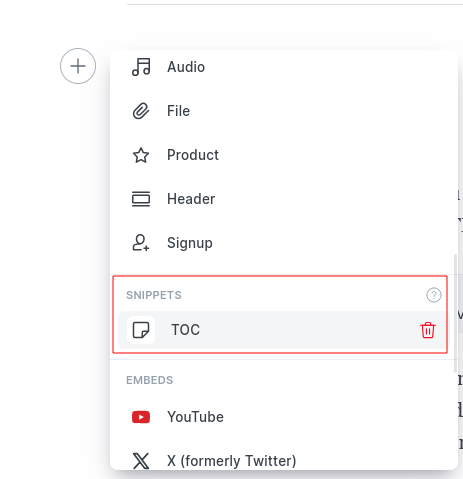
After inserting the HTML element, you can click on the "Save as Snippet" function and assign a name:

After that, you can easily add the block to any post with a click:
With this method, you can create a flexible, easily integrable, and automatically updating table of contents for Ghost. Have fun testing it out!




Member discussion